Showing posts with label Top 10. Show all posts
Smartphones are known for their poor battery life. As we use it for more and more activities Like checking mails, Browsing Net , location Services, Playing games the battery will be ticking down to zero. To avoid this happening and to make your smart phone battery last longer follow the tips posted below. You try these 10 tips on your phone tomorrow and observe the instant results. 

These changes can be applied to any smart phone running on the operating systems Android Windows Blackberry IOS. As we can not decrease the usage of the phone but become control over usage.
Increase smart Phones battery Performance

Here are the 10 Tips to Increase Battery Life of Smart Phone :

1. Reduce Brightness of Screen :

The smartphones screen is large and this is the main reason for the rapid discharging of the battery.Your touch-screen is the single biggest drain on battery life so it is advised that  the brightness right down – especially when indoors where even 35% brightness is sufficient. Or else you can set your Brightness to Auto mode which is available in almost all smart phones.

2. Managing your apps :

Always keep an eye on background running application and clean them time to time. Uninstall unnecessary applications than run background. It is preferred to use battery saving apps like  Battery Life Pro or Easy Battery Saver which shows a detailed information of battery and device performance.

3. Set Your screen time out to Minimum :

Under your phone's display settings menu, you should find an option  'Screen Timeout' or something similar. (On an iPhone, look for Auto-Lock in the General settings menu.) This setting controls how long your phone's screen stays on after receiving input, such as a tap.
Decrease screen time out

On every android phone the minimum screen timeout is 15 seconds.  On an iPhone, the minimum you can set is 1 minute.

4. Use a dark Wall Paper / Lockscreen : 

Using very light wall paper consumes more battery as it requires more contrast. So it is good to use a dark coloured wallpaper and Lock screen as these are seen  more frequently. 
Note : Don't Use any live Wall Papers / Lock screens.

5. Minimize playing Games on Smartphone :

Playing games that to motion sensor games will consume more power and the battery will discharge quickly.Play games in your smart phone at home where you can charge your device when needed. Avoid playing games outdoors if at all you are bored then play simple games rather than playing motion sensor and games that uses high graphics.

6. Disabling 3/4G  :

The 3G and 4G radios use more power than their 2G or EDGE counterparts, so turning them off can help if you really need a bit extra. The option’s available under Mobile Networks on Android Windows, or Cellular on iOS. 

7. Switch Off Bluetooth and Wi-Fi :

Don't keep Bluetooth and Wi-Fi services on every time. They consume battery power. When you are sharing a file then only use bluetooth  and it is advised to set limit for your phone visibility. Switch off Wi-Fi when you are not using it.

8. Turn Off Vibrations / Touch Sounds etc :

Vibration consumes more battery so keep off the vibration notifications. Even Touch sounds and Vibration feed back on touch can increase battery consumption.

9. Switch Off Location Services ( GPS ) :

GPS is a very useful feature in most smartphones, but unfortunately they’re also a great way to drain your batteries. Keep an eye all location services using apps like disabling this option in facebook and other applications. Look for the GPS indicator in your menu bar to see whenever the location services are enabled. If your GPS is running when you’re not using, turn it off to save battery. Use it when you are in need of it and switch it off other times.

10. Lock Your Phone :

Locking the screen helps you to prevent unwanted things that happen when you place the phone in your pocket and also helps from strangers. Always lock your phone after you have used.

Follow these tips today and you can definitely observe a change in your battery level at the end of the day. 
You can also carry extra battery or other wireless charging devices to charge your smart phone when required.
It has been quite the controversy over flashlight applications over the last year. Flashlight apps are very useful, most users are apprehensive about installing them because their have been several stories about apps The brightest flashlight can make working in the dark easier and less frustrating. It illuminates the world's dangers so you can face down your fears one confident step at a time. Specifically, an inordinate amount of them collect data about you to sell to third parties and that is how they offer their app for free and without advertising. Unfortunately for them, not a lot of people can stomach giving away things like their location and their call logs just to use a flashlight app for free.

Top 10 Flash Light Apps for Android:

Some examples of extra permissions in most flashlight apps include the ability to find out your exact location, access your photos/media files on storage and view your device ID and call information.

Tired of other flashlight apps that read your location, personal information, phone calls, and network activity etc?

1. Flash Light HD LED

Flashlight HD LED which is the most simple app that can utilize both your home screen and LED flash to produce a flashlight. The LED flashlight can be controlled by a home screen widget that is included. In the app, you can turn your screen into an flashlight as well using whatever color you choose from the app’s color picker. It’s otherwise very simple without any other bells and whistles.

2. Flash light BY Simgears:

Flashlight by SimGears, which is very basic and gets the job done without pushing any unnecessary permissions. It supports four different widgets so you can switch the light on and off from your home screen of your widges. The one feature we really like is the app’s ability to automatically turn off the flashlight once it recognizes that you’ve put your phone back into your pocket. As a bonus, you also get to customize the appearance of the app and the widgets to your liking.

3. Colour Flashlight:

Developed by the team behind the ColorNote app, Color flashlight is an interesting app which allows you to not just use your camera LED, but also your display, to show different colors of lights and effects like a burning candle stick, a romantic display of hearts and an “I love you” sign along with the option to display sliding, glowing text on your screen.

4. Tesla LED Flashlight :

If there was ever an app from “a name you can trust”, it’s TeslaLED Flashlight. It’s made by the same people who develop Nova Launcher and the once popular WidgetLocker app. It contains a simple interface, a home screen widget that you can also theme, and a barebones permission list. There is also the standard screen features like strobing and Morse Code. It hasn’t been updated in a very long time (2011) but still manages to work with most devices. That means if you find a bug you’ll probably have to go to another flashlight app.

5. Torch:

Torch is a friendly application because some people may already know it because it’s been integrated into custom ROMs before. That means some root users may recognize this one. It comes with a home screen widget but no screen-flashlight options. Thanks to this, it’s the second smallest app on this list (less than 1MB) and it’s great for those who just want the home screen widget.

6. Amazing Flashlight:

The user interface of this app is very good looking but the icons are placed randomly and we had to test every icon separately just to know what it does.Normal LED flashlight, Screen light, Strobe light, and Police light effects are available. You can send emergency SOS signals too. A compass has been provided to give you directions in case you are lost.This app also offers a unique “Night-Vision” mode. This feature helps you to see in dark rooms through the device’s camera.Amazing Flashlight is an ad-supported application.

7. Privacy:

Privacy Flashlight is made by a company (SnoopWall) that touts the need for privacy about as much as a company can. Thus, you can expect that their flashlight app follows true to their calling. Aside from using literally the bare minimum permissions necessary, the app is also very small (less than 1MB). It also contains a widget if you need that and a very minimal app interface. If you’re interested in a fun read.

8. Tiny Flash light+ LED:

This is Tiny flashlight which is very small and it is with LED. Moreover Tiny Flashlight + LED is one of the oldest flashlight apps on the Play Store and also one of the most reliable. It doesn’t just light up your way in the dark, but also has additional goodies like a strobe light function, blinking lights, Morse Code and a fun Police Lights simulator. Please note that network permissions are required to display ads.

9. Smart Flash light:

The name itself indicates smart and we don’t know why the application is called “Smart Flashlight” because it lacks many features. If you just want the “Flashlight” and the “Screen light” feature, it won’t disappoint you. However, it doesn’t offer anything else. This option is great for people who don’t want all the bulky features, but need a flashlight.

10. Super bright LED Flash light:

Super-Bright LED Flashlight is already an intensely popular application in the world, as of the time of this writing. This one focuses a little more on aesthetics than most flashlight apps and it does look really nice. There is also a strobe feature that is adjustable if you happen to need that. Its a very bright light which is totally different from other flash lights.

I think you will like our post about 10 best flashlight apps and from this you can select the best flash light and use it. Thanks for reading the post.
Hello Friends, Are you planning to buy the best smartphone in market within the budget of Rupees 10,000?. then we will help you out to choose the best features phone. If web sources to believe , people search most  for the best mobile within the budget of 10000 Rs. So we  are posting here the top 10 best smartphones under 10,000 Rs.

Here is the List of Best smartphone within the budget of 10000 Rupees ( 10 K) :-

Start reading below and choose the best phone that suits your life style and taste. These phones are best selling feature phones now in the present market. Feeling excited to know about Smart phones below 10K have a look at them..

Nokia X:

The Nokia X  was unveiled as part of the new Nokia X family on February 24, 2014. It  runs on a  Nokia X software platform.  It is highly customized  version of android. It uses AOSP version as baseline for OS. While the Nokia X customers can’t access Google Play Store but users  can install apps from any third-part y source.


Specification:

General :  Dual Sim , Nokia X software platform 1.0 (Based on Android)
Display : Touch,4 inches,480 x 800 pixels
Camera : 3.15 MP, Video Recording
Memory : 4 GB Inbuilt Memory, Memory Card Support, upto 32 GB
RAM : 768 MB RAM
Processor : 1 GHz, Dual Core Processor
Connectivity: 3GWiFi with hotspot,Bluetooth,GPS
Extra : Music Player, Video Player, FM Radio, 3.5 mm Headphone

Price: Rs. 7,138 at  Indiatimes Shopping

Samsung Galaxy S Duos 2

Samsung with its wide range of verities, it has always remains a favorites for Android phone lovers. It is similar to its past version of  Samsung Galaxy S Duos but with updated  android version . It has the same rounded-edge design, the button appearance and form .It is available in two colors. It features 4-inch WVGA display  and 768MB of  RAM.   It  aimed  at indian customers by  providing access  to Samsung  application store in Hindi, Punjabi, Bengali, Tamil, Telugu, Kannada, Malayalam, Assamese, Marathi and Gujarati.


Specification:

General : Dual Sim Android, v4.2 Slim
Display : Touch4 inches,480 x 800 pixels
Camera: 5 MP AutoFocusFlash, 720p HD Video Recording, VGA Front Camera
Memory:  4 GB Inbuilt Memory Memory  Card Support, upto 64 GB768 MB
RAM  : 768 MB   RAM
Processor :  1.2 GHz, Dual Core Processor
Connectivity : 3GWiFi with hotspotBluetoothGPS
Extra: Music PlayerVideo Player, FM Radio,3.5 mm Headphone

Price : Rs. 8,615 at  Flipkart

Micromax Canvas 2 Plus A110Q

Micromax gives very good competition in India to the big mobile companies .With its wide range of mobile it has always attracted  all age of  people .MIcromax canvas 2 is another updated version of Canvas. The front panel of the A110- Canvas 2 borrows many design cues from the Galaxy Nexus. The phone’s build is plastic and has a matte finish back panel that keeps the device clean and smudge free.


Specifications:

General : Dual Sim Android, v4.2.1Slim
Display : Touch, 5 inches 480 x 854 pixels
Camera : 8 MPAutoFocusFlash, 720p HD Video Recording ,2 MP Front Camera
Memory : 4 GB Inbuilt Memory Memory Card  Support, upto 32 GB
RAM : 1 GB RAM
Processor : 1.2 GHz, Quad Core Processor
Connectivity : 3GWiFi with hotspot,Bluetooth,GPS
Extra: Music Player, V ideo Player, FM Radio, 3.5 mm Headphone

Price :  Rs.9999 at shopping.indiatimes

Nokia Lumia 525

If you  want to go for a phone that is not Android, then you can opt for Nokia Lumia 525. It is said to be one of the cheapest Windows Phone 8 mobile. It lacks most of the flair and neat extra touches of the Lumia 620, but yet a solid Windows phone. The Nokia Lumia 520 comes with 5-megapixel camera at the rear and   it is an autofocus rather than fixed focus system, which is usually on-board most budget smartphones. It is  powered by a 1GHz dual-core Snapdragon S4 processor and Adreno 305 GPU
It differs from previous version Nokia Lumia  520  in Ram ,which has 512 Mb ram.
Specification:

General : Windows Phone, v8Slim
Display : Touch, 4 inches, 480 x 800 pixels
Camera : 5 MP AutoFocus, 720p HD Video Recording
Memory :8 GB Inbuilt Memory ,Memory Card Support, upto 64 GB
RAM : 1 GB RAM
Processor : 1 GHz, Dual Core Processor
Connectivity : 3GWiFi with hotspot, Bluetooth, GPS
Extra : Music Player, Video Player, FM Radio3, .5 mm Headphone

Price: Rs. 8,971 at  Flipkart

Karbon Titanium S5 Plus

Karbon Titanioum S Plus has been successful to make its first impression to be a good one. It powered by a 1.2GHz Qualcomm Snapdragon S4 MSM8625 quad-core processor. There is 4GB of internal storage, which is expandable up to 32GB via a microSD card. These specifications are enough to make it a good multitasker.


Specifications:

General : Dual Sim Android, v4.2Slim
Display : Touch, 5 inches 960 x 540 pixels
Camera : 8 MP Auto Focus Flash, VGA Front Camera
Memory : 4 GB Inbuilt Memory, Memory Card Support, upto 32 GB
RAM : 1 GB RAM
Processor : 1.3 GHz, Quad Core Processor
Connectivity : 3GWiFi with hotspot,Bluetooth,GPS
Extra : Music PlayerVideo Player,  FM Radio,3.5 mm Headphone


Price  : Rs. 9,520 at  Indiatimes Shopping

Lava Xolo A500S

Xolo A500S  is a great build Stylish Handset. It weights about 122 grams . it is one of the cheapest phone and it comes in three  colors. powered by the latest 1.3 GHz dual-core MediaTek MT6572 chip that has integrated Wi-Fi, FM, GPS and Bluetooth. The phone comes with dual SIM support with dual standby.


Specifications:

General : Dual Sim Android, v4.2Slim
Display : Touch, 4 inches, 480 x 800 pixels
Camera : 5 MPFlash 720p HD Video Recording, VGA Front Camera
Memory : 4 GB Inbuilt Memory, Memory Card Support, upto 32 GB
Ram : 512 MB RAM
Processor : 1.3 GHz, Dual Core Processor
Connectivity : 3GWiFi with hotspot, Bluetooth, GPS
Extra : Music PlayerVideo Player, FM Radio, 3.5 mm Headphone

Price : Rs. 5,799 at  RetailBunny

iBall Andi 5h Quadro

iBall a well-known computer hardware manufacturer is establishing its name in the smartphone market.  One of their latest launches is the iBall Andi 5h Quadro he iBall Andi 5h Quadro comes with a 5 inch touchscreen with qHD display, IPS feature and a screen resolution of 540 x 960 pixels. The screen may not be as crisp as a 720p screen but looks good enough seeing the price tag it comes with.


Specification:

General : Dual Sim Android, v4.2Slim
Display : Touch,5 inches 960 x 540 pixels
Camera : 12 MP AutoFocus Flash,2 MP Front Camera
Memory : 4 GB Inbuilt Memory, Memory Card Support upto 32 GB
RAM : 1 GB RAM
Processor : 1.2 GHz, Quad Core Processor
Connectivity : 3GWiFi with hotspot, Bluetooth, GPS
Extra : Music Player Video Player, FM Radio ,3.5 mm Headphone

Price: Rs. 9,650 at  Snapdeal

Gionee M2

Gionee  as a brand  has come up with really some awesome smartphone, impressing all its customers. Gionee M2  smartphone is   powered by a 1.3GHz quad core processor, but unlike the other handsets the M2 comes with long lasting  big battery of 4200 mAh capacity . Recently  launched Gionee Elife S5.5 which is world’s slimmest Smartphone.


Specifications:

General : Dual Sim, Android, v4.2Slim
Display : Touch , 5 inches, 480 x 854 pixels
Camera : 8 MPFlash, 720p HD Video Recording, 2 MP Front Camera
Memory : 4 GB Inbuilt Memory, Memory Card Support, upto 32 GB
RAM : 1 GB RAM
Processor : 1.3 GHz, Quad Core Processor
Connectivity : 3GWiFi with hotspot, Bluetooth, GPS
Extra : Music Player, Video Player, FM Radio 3.5 mm Headphone

Price : Rs. 9,999 at  shopping.indiatimes

Panasonic P31

Panasonic newly launched smartphone  Panasonic P31 is available now to buy.   The P31 is powered by a 1.3GHz quad-core processor and 1GB RAM. The phone comes with 4GB internal storage expandable through a microSD card and a 2,000mAh battery.  It runs Android 4.2.2 Jelly Bean .


Specification :

General : Dual Sim, Android, v4.2
Display : Touch, 5 inches
Camera : 8 MP Flash 1080p HD Video Recording, VGA Front Camera
Memory :8 GB Inbuilt Memory, Memory Card Support, upto 32 GB
RAM : 1 GB RAM
Processor : 1.3 GHz, Quad Core Processor
Connectivity : 3G WiFi, Bluetooth, GPS
Extra : Music Player Video Player

Price  : Rs. 9,799 at  Snapdeal

Micromax Canvas Juice A77

Micromax is one of the largest selling mobile company in India ,Recently it had launched micromax canvas juice at the price tag of Rs.7,999.It has  attractive specifications with 3000 Mah battery at low price.  This  device is powered by 1.3GHZ processor (Media Tek MT-6572 chip-set)with 400 mail GPU. It is running on 4.2.2 jelly bean OS with 1Gb of RAM in which 840 Mb is available for user.


Specification:

General : Dual Sim,Android, v4.2.2Slim
Display : Touch,5 inches,480 x 854 pixels
Camera : 5 MPAutoFocus Flash, 720p HD Video Recording, VGA Front Camera
Memory : 4 GB Inbuilt Memory, Memory Card Support, upto 32 GB
RAM : 1 GB RAM
Processor : 1.3 GHz, Dual Core Processor
Connectivity : 3GWiFi with hotspot,Bluetooth,GPS
Extra : Music Player, Video Player, FM Radio with Recording, 3.5 mm Headphone

Price: Rs. 7,999 at  HomeShop18

Even though there are many mobile in market within this  range but we have placed here only  the best smartphone within the range of Rs 10,000.

        We have  tried our level best  to put  down all best Smartphone  in this list . If you have any questions or suggestion regarding this content or If you feel that I have missed something then please feel free comment below.
Often times we find our PC slow down and sometimes we also notice a very poor system performance. Most of the times, we try consulting a computer engineer or we get set to buy a new machine, ending up spending bucks. Isn't there any other solution for this problem? Is your system getting old and you are facing a head-ache big time? Sit in-front of it and spend a few minutes on it. Clear and clean your system sitting at home and get it back on work. This helps in increasing your PC speed and you can surely find the difference. read below to find the tips to  increase speed of your computer either Windows or MAC

10 tips to increase speed of your pc

Here are 10 Tips which can speed up your Computer

1. Remove Viruses, Malware and Spyware:

The most common reason for PC's to get slow and behave all weird is the viruses, malware and spyware they have
Tips to Increase speed of  PC
  • It is easy to detect the viruses sooner. Do not worry if you did not knew how and what. Download an Anti-Virus software, available in trail versions and also complete versions in some of the sites, you can also buy one outside in any computer dealer shops. 
  • Some of the useful antivirus soft wares are Avg,Avast and McAfee
  • Among these, McAfee also provides protection on all the web-browsers. You just have to download the extensions on your web browsers and there, you are protected from all virus-filled and suspicious sites. 
  •  Spyware Blaster protects you from all the spyware and malware. 

2. Clean your Disks:

If you do not know this option before, You must be having a junk of Unwanted and unnecessary files on your disks which you must clean up. 
Perform simple steps to clean-up your disks.
  • Click start in the bottom left corner.
  • Click run.
  • Type, "cleanmgr.exe" in the text field as shown in the picture.
  • Press "ok". 
Tips to Increase speed of  PC
  • Select the drive you want to clean up.
Tips to Increase speed of  PC
This can take a while if you have never done it before.

3. Clear unwanted soft wares:

Increase computer Speed
Most of the times, we download multiple soft wares for many purposes and after you are done with the work, we avoid the soft wares and they stay unused in your system from weeks to months and sometimes years too. So please do clear up all those useless soft wares.
  • Click start, then click control panel.
  • Click add/remove programs.
  • Highlight any old software you do not use and then click "remove".

4. Defragment:

Increase computer Speed

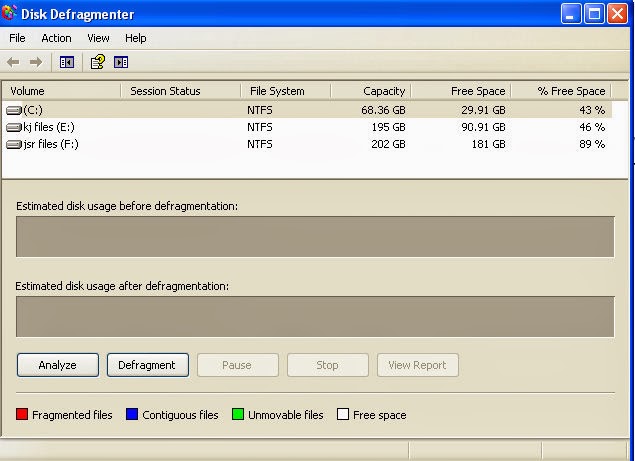
Disk defragmentation is one of the best and most effective options to increase your system speed. This will place similar files physically closer on the hard disk and will help improve load speeds. Similar to the disk clean-up, if you are doing this for first time, it may take time.
  • Click start, again, then click run.
  • Type, "dfrg.msc" in the text field.
  • Click Defragment to start it.

5. Clear temporary files:

Whenever a program runs on your computer, it leaves certain files on your machine which consume a certain portion of disc space. Over a period of time, hundreds of programs run and thousands of files pile up on your device - which eventually decelerate your machine and sometimes lead to system crash. Therefore, you are suggested to periodically delete temporary files
Increase computer Speed
  • Go to Start and click Run.
  • type "%temp%" and click OK.
  •  A folder full of files is seen.
  • Select those temporary files and delete.

6. Speed up the system:

Speed up Windows PC
By turning off Windows graphics, you can set your computer to deliver a slightly better performance.

Go to Start, (Settings), Control Panel, System. 
NOTE: You may need to 'Switch to Classic Mode' to see the System applet.
  • Go to the Advanced tab. 
  • Click the Settings button under Performance.
  • Select the 'Adjust for best performance' radio button, then Apply, and OK.
The graphics aren't as flashy, but your computer will run a lot faster.

7. Search Find and Remove duplicates:

You might have saved same files in different parts or drives of your system. So hurry up and delete the duplicates. This clears up unwanted files in your system. Both Windows users and also MAC users can use the free Easy Duplicate Finder  —this is  a lightweight and feature-rich program that does the job fast  

It helps to search for duplicate content you stored in your device and directs to remove it this search also includes external storage such as Hard Disk Drives and Flash Drives etc.. Then this scanning result is helpful in deleting the duplicate content. For photographers who want to find and remove duplicate photographs, a free program called Duplicate Photo Cleaner finds duplicates even if they were re sized or edited. 

8.Optimize your web browser:

Increase computer speed

All of us have multiple web browsers running on our system. How ever we have to deal with some or the other browser at some point of time. All we can do is decrease the number of extensions, add-ons and plug-ins installed which may affect the performance of your device.

9. Sort out the system Registry:

Increase computer speed
One of the main causes of a slow Windows PC is a corrupted registry. The Windows registry configures and handles every hardware and software operation on your computer and tends to get corrupted by obsolete/invalid entries. Get the free Registry Repair . 

It scans your system registry for a number of common issues and fixes them instantly. It also makes a backup of any registry change so that if your system becomes unstable, it can be restored back to its original state. 

10. Clean all the system:

Increase computer Speed
Download CC cleaner. This software cleans up all the temporary files from your system and web browser enhancing your system and internet performances.

Still if you are facing problems with the speed of your PC you can ask for help who can guide via team Viewer and other softwares..

Liked this Post??? share it with your friends on Facebook and other social sites.. and also share your view with us in comments below...
Downloading Movies Videos and Files through torrent has been increasing day by day. To download files faster it is important that the torrent should  have a good number of  seeds and leaches. So you should always prefer downloading torrents from the top 10 best torrent sites as there will be many seeders and leaches. And also you can see in the user comments whether the file is original trusted or any other issues will be clarified without wasting your time.

Here are the Best Sites For Downloading TORRENTS :

1. Torrentus.to

Rather new search engine for bittorrent files that works similar to Torrentz. The service creates easy and convenient search through more then 25 trackers at once.
check here: http://torrentus.to/

2.TorrentDB

TorrentDB is ultimate database filled with torrent files from over the whole network. It's less a tracker site or a search engine, it's more a place where you will be able to find every torrent file that was ever uploaded to the network. TorrentDB picks description, content, quality, rating, seeders and leechers amount from the external sources and provide additional links to the trackers to get the file
check here: http://torrentdb.li/

3.The Pirate bay :

The Pirate Bay (commonly abbreviated TPB) is a website that provides torrent files and magnet links to facilitate peer-to-peer file sharing using the BitTorrent protocol. It was founded in Sweden in 2003. Due to some issues it is blocked in 15 major countries including India UK Sweden Norway etc.
You can also get access to Pirate bay in these blocked countries using Proxies. It is the best place to download torrents with over a billion pageviews  a month.

4. Kick Ass torrents :

Kick Ass torrents is also one of the best place to find all types of files like movies videos files softwares to download  through torrents. It also uses peer to peer file sharing using Bit Torrent Protocol. It was founded in 2008.  It is Blocked in UK Ireland Belgium and other countries due to copyright issues.

5. Torrentz.eu :

It is the second most popular torrent website next to Pirate Bay.This site indexes torrents from various major torrent websites and offers compilations of various trackers per torrent that are not necessarily present in the default .torrent file, so that when a tracker is down, other trackers can do the work. You can search for the desired file without any registration and can be downloaded from the given list of torrent sites.

6. Extra torrents :

Extra Torrent is the 5th most visited torrent site. It has all kinds of torrent files and this is also blocked in some major countries.Beside the torrent it has the comments link, Size,Peers,Seeds and health of the torrrent.

7. EZTV :

It indexes torrents and provides magnetic links. It stictly contains only Televison based content like TV shows etc.It is more popular in Australia.

8. Bitsnoop :

Bitsnoop is a torrent search engine. It was launched in 2009. You can search for any content and download them free. It searches all the bittorrent clients andthe torrents can be downloaded directly without any redirection. 

9. Monova.org :

Browse and Download Movies TV shows Pictures animes Games from this Sites. Daily many files will be added to this sites. Beside every torrent you can see the size seeds peers and health of every torrent. CHoos the file with more number of seeds and download torrent.

10. Torrents.to :

It is also similar to Bitsnoop. It helps in searching the file in the other bittorrent sites. Applying filters you can search for content in the specific torrent site. It makes your work easy and simple. It has the categories of the specialized torrent sites where the probability of finding are more. Like EZTV for tv shows what.cd for music etc.

11. Torrent Reactor :

Choose the category and search for the files you wish to download. All kinds of files and media content are available in this torrent site. It has an alexa rank of 3k .

12. Seedpeer.me :

Sometimes we face situation where a torrent file downloads incompletely. It will be left ate 99% seedless. By downloading files from seedpeer you will not be facing such errors. The admins of seedpeer will verify all things and then make the torrent available.

Link : http://www.seedpeer.me/

These are the best Sites to Download Torrents. Download and enjoy..

Most of the people love reading but may not have either enough money or enough time to spend shopping. It is also difficult to carry and maintain many books.E-books have become the trend now and most of us love downloading E-books and going through them in our respective PC's and Tablets.But the problem comes when we do not know where exactly can we get any e-book for free. So here are the top Websites which provide free e-books.Download E books for Free Website are listed below.

Top websites to Download free e-books:

1.Project Gutenberg:

This is one of the leading website for downloading free e-books. The site contains more than 42,000 free e-books and Kindle books to choose from. All these books can be either read online or downloaded to your PC for offline reading.

2.Hundred Zeros:

Hundred zeros is another leading and useful website. It is mostly the collection of best-sellers for free. You just have to download the free Kindle reader app to read books on your PC or Tablet.

3.FreeBookSpot:

This website has free e-books that span across 90 categories. The website just links free e-books from other sites. You can download scientific, engineering, programming, fiction and many other free books from this website.

4.Freecomputerbooks:

This website comprises of Free online Computer, Programming, Mathematics, Engineering, and Technical Books, Lecture Notes and Tutorials. It is very well categorized by topics, with 13 top level categories, and over 200 sub-categories.

5.GetFreeEBooks:

This is yet another website which offers huge stream of free e-books. Authors can submit their e-books for free on this site, which can be then downloaded by the vast community of readers for free. Currently the site has more than 100 categories of free e-books to read from.

6.ManyBooks:

ManyBooks provides free e-books for your Smart phones and Tablet PC's. You can search for your desired book from a clooection of over 21,282 Books. These all books are absolutely free and can be downloaded from this site easily.

7.FreeTechBooks:
This site has a variety of books on the topics of computer science Engineering, programming books, a huge collection of textbooks for free and can be downloaded legally from this website. The Free Tech Books Website also has a huge collection of programming language books which are mainly useful for coders to learn about coding...


8.Bookyards:

This website covers all the topics and provides you with many free e-books.

9.E-booksdirectory :

Another awesome website for downloading e-books for offline reading. Go for it.


10.PDF Books:

This is the best website you can start downloading the e-books. It does not have a huge stream of e-books but a limited collection. But give it a try.


There are lot more websites which provide free e-books like 4eBooks, scribd, knowfree etc. Download E books for free and start reading now.


Nokia's Windows phones are becoming Popular day by day. If you are a Windows Phone user especially if you are using Nokia Lumia 520 and 525 then this post is for you. Here is a list of top 20 Best Apps For Nokia Lumia 520 and 525 Windows Phones Download these below mentioned Applications and make your phone more useful and smart. There are also Pro apps mentioned below but most of them are free.

Also Read :  Best apps For Moto G 2
Best Apps For Nokia Lumia

1. Adobe reader : 

Adobe reader Windows App

Adobe Reader is a free application provided by Adobe. Using this app you can Access PDF files on your smart phone. You can Read E-Books and other PDF files using Adobe Reader. It has a good interface with Zoom-in and Zoom-Out options with Text Highlighting.You can even add comments with sticky notes any where in the PDF file.


2. Cam Scanner :

Cam Scanner Windows App

This application turns your Nokia Lumia 520 Windows phone into scanner.A free application with pro applications.Scan files and images using this app and save in PDF format.You can sync scanned files to the cloud storage.It a top rated application.

3. Moli Player :

Moli Player Windows App

We often view many videos on our smart phone and some times download videos. To play these videos there are many video players but Moli Player stands in front.it can play almost all kind of video formats that you can imagine.It is a pro app you have to buy it from the Windows store.You can also play Subtitles for videos

3. True Caller :

True Caller Nokia Lumia

True Caller is an international phone directory.This is the top rated app and can be used on your Windows Phone. You can find name and location of unknown numbers.When you get wrong calls or receive calls from un-known numbers this apps displays the name of the contact.True caller is widely used and it has got a good success rate.

5. Facebook :

facebook Nokia Lumia

Facebook is a social networking site.Download this app and stay connected with your friends and you can also chat with them.This is also a free app and needs an internet connection to access.

6. Awesome Lock :

Awesome Lock Best app

It is a pro app. You can customize your lock screen with weather updates and other info you own. You can also have stock information on lock screen.It needs data connection enabled.

7. Whatsapp :

Whats app Nokia Lumia

Whatsapp is Instant Messaging application. It can be downloaded for free. It is free for 1 year and thereafter it charges about a dollar per year.About 1.1 billion members are on Whatsapp. Install this application on your Windows phone and start chatting with Friends.This is the Best app for Nokia Lumia 520 and 525

8. Twitter :

Twitter is a free Social Networking application. Twitter is the Top Social Networking website where daily millions of tweets are posted.By using this app you can Read and post tweets.You can follow many celebrities on Twitter and know about latest news and trending topics.

9. Sky Drive :

Sly Drive Microsoft

Sky Drive is a free app to save your files in Cloud Storage provided by Microsoft. It is similar to Google Drive.Upload files to Sky Drive an you can access these files any where virtually by signing in to your Microsoft account.

10. You Tube :

YouTube Windows phone

YouTube has millions of videos.Daily some lakhs of videos are uploaded to YouTube. This is a free application and can be used to view the youTube videos.Not only viewing them you can also share them on social media.

11. Call Recorder :

Call Recorder

Record your calls using this app. It doesn't worn on Windows 8 because of microphone mute for third party devices.But in Windows 7 phones you can install this and record your calls.

12. Google Maps :

Google maps

Google Maps, one of the most accurate maps can help you in searching places and calculating routes.It is a free app on Windows store. You can view local places and business using this app. As it needs internet connectivity you can not use it for offline navigation

13. We Chat :

WeChat Nokia Lumia

We Chat is the popular Instant messaging application after Whatsapp.Unlike Whats app it is free for life time and you can even use it for video calling and for sending voice messages.if you are not satisfied with whats app you can use this app and chat with friends who are already using this app.

14. Skype :

Sky Drive Windows Phone

Skype is a popular video calling application. Through skype you can make video calls and voice calls all around the world to free to even PC users.This is also a free app and needs WiFi or data enabled.You should have a camera to your phone to make video calls and a faster internet makes this app working with ease.

15. Video Locker :

Video Locker

Video Locker protect your videos. You can Lock your videos using this app and can be password protected. You can lock personal videos and feel safe. 

16. Youtube Downloader :

Youtube Downloader Nokia Lumia

Download YouTube videos to your smart phone.Save the video and save it for offline viewing. Download the funny and interesting videos from YouTube.

17. Photo Funia : 

PhotoFunia is an cloud based photo editing tool. It has many options to add effects to your images or pictures and make them more attractive.But the disadvantage is it needs an internet connection because effects are performed on Cloud. Add the default effects to images and making changes to these effects can make this tool more interesting. 

18. Wikipedia :

Wiki pedia

we all know about Wikipedia. It doesn't need any introduction. The Wikipedia applications helps in finding information about any thing.It is free app but needs internet connectivity to use this app.

19. Viber :

Viber is instant messaging app used for mostly video end voice calls.It is a free-ware app and can be used to make voice calls.It can be used as an alternative to WeChat.

20. Windows 8.1 launcher :

8.1 Launcher

If you are bored with the default Windows launcher then you can try this app.This is a free app and  when installed makes Metro style Windows  8.1 style.It shows live tiles and makes your phone even smarter.

The above mentioned are the best apps for your Windows Phone .Besides these there also number of other useful apps.

Comment below if I missed any app that you thick should be in the list. These are the best downloaded apps for Nokia Windows Phone 8.1 Lumia Series.

For more Tech Tricks and Tech Updates Like us on Facebook Or Subscribe us via E-mail.