Showing posts with label Best. Show all posts
Are you an extrovert or an introvert? Have you already made friends with your group mates, or you're a freshman and don't know anyone well enough? In any case, it will be great for you to play video games with your group mates together. If you are an extrovert, you will add one more kind of interaction to your relationship with friends, a really captivating one! Else wise, you can become a part of the company without the awkward moment of choosing the topic, starting a conversation and deciding how to spend time together and how to get to know each other better. You bet, you'll go through wonderful adventures together! You can play anytime, anywhere: on the smartphone, on PC, Mac or console – no limits today. If you are a conceptual single-player, or just want to spend some time in private - discover great indie games for lonely wolves! And if you are looking for games to play with friends — here are some ideas!

So, ask your mates what are their favourite fun group games and, for sure, they will name one of the five listed below! The battles and contests, the growth and glory are waiting! And don't let the homework spoil your time with group mates! You can make progress both in the real world of study and game dimension with college essay writing help! 

Overwatch


Surely, you're already playing it. Surely, you have seen tons of fun art, and maybe even created your own. Together with your group mates you will become brightest characters. Once they found a way to the peaceful future on the mad planet, nearly destroyed by the war. Now the new danger is coming, so the heroes are here to help – merry and cruel, beautiful and funny, people and robots.

Team Fortress 2


On August, 24 this year Team Fortress celebrated its 20th birthday. The players still remember great specials like birthday cakes or funny screams of rejoice. Brilliant cartoon-like design and caricature characters make the Team Fortress 2 really deserving the awards for best online multiplayer games. And it did won some awards. The intriguing feature is the chance for new players to obtain weapons and abilities on a random basis. To get it for sure, do special tasks and unlock corresponding achievements. And don’t forget the interesting profound plot.

Asphalt 8: Airborne

This is one of best free multiplayer games, available for Android. You can enjoy this arcade game everywhere, with fastest cars, familiar and new ones, just choose what to drive - Ferrari (up to FXX), Lamborgini or Pagani Zonda. This is the opportunity to meet the rivals from your group and from all over the world online. The tracks in various corners of the planet, with exotic landscapes from Venice to Nevada, make you see colourful dreams and feel like you've been there indeed!

FIFA 16


Maybe, you are playing in the University football team or just dreaming of it. You can create your own team with FIFA football simulator, enjoying true-to-life atmosphere. It is fun not only to play but also to watch, and this is a really cool idea as a kind of party games with your group mates. You just have to find out, who has a console, free flat and the biggest screen. And then organise a party with a tournament for football fans and their friends.

Dota 2


This is no more just one of the multiplayer games. It is a lifestyle. We've got millions of players and world tournaments in Dota. Careful! You might just fall in love with it and get addicted! Become one of five members of two rival teams and win a victory in the battle. The main task is to destroy enemy's base. The variety of the heroes for free allows everyone to pick up what is best for him or her. By the way, the teamwork is exceptionally important here, so team up with only the best friends among your group mates.

Hope you have liked the best 5 video games.If we have missed any best game or if you know any better game then please comment the game below.
Android Rooting a popular word heard by Android users.So know about What is Rooting a phone? How to do it?? Is it is advantageous or not.Read below and you can find the answer.If you are in a dilemma whether  to root your Android phone or not this post will help you to come to conclusion.
Advantages and disadvantages of rooting

What is Rooting a Phone : 

Rooting actually means unlocking root access to your device.To understand about rooting  first try to know the difference between rooted device and an normal device.When you are using sofware normally (not rooted) you are just a guest user and you don't have any privileges of accessing core files. That is you can not install applications that needs or access the core files. On the other hand coming to rooted device you can access the core files or system files. You can give permissions to applications that deals with them.
Unlocking phone Through Rooting


Also Read : Download WeChat For Windows

For Example : let us Consider Nandroid backup application which is used generally to backup files but this application also backups the android core files.So to install this app you need to have rights to give permission to access internal files which needs rooting. 

I hope it is clear now. So finally rooting means nothing but unlocking root access to give extra powers to applications.

How to Root  ?? 

If you have decided to root your device you find many sources on we to guide you. XDA Developers is one of the best place where you find more root information and hackers and tweakers discuss and share links and guides.
Note : If you are not aware of rooting Please don't try it
Choose the custom ROM specified for your phone model.All models may not have the same ROM. A small mistake can brick your device. So gather more information about the ROM and choose the best.And my advice is if you are not aware of rooting stay away from it.
Rooting the Phone Asking permission

Also Check : Download temple Run Unlimited Coins

Advantages of Rooting :

Run Special Applications :

As I said earlier rooting can help in installing apps that can access the core files.So Installing these applications can be helpful to know system data and usage than the normal applications. They provide more information.

Install Custom ROM's :

If you are bored with the default stack android you can install custom ROM which provide new customizations and add new flavour to your device.Choosing a better ROM can improve speed and the device performs better.

Install Applications on SD card :

Rooting also enables installing applications on external memory which is more helpful if you have less phone or system memory.

Un-install Unwanted applications :

As manufacturer gives some apps most of them are not useful so they can be un-installed which increases phone internal memory.

Also Read :How to Install Android apps 

Overclocking and Under clocking :

Manufacturer sets a specific clock frequency. using apps you can increase or decrease this Clock frequency. Increasing Clock frequency can boost performance but decreases battery performance and decreasing clock frequency increases battery and decreases performance.

Disadvantages of Rooting :

Loosing Warranty :

As you are changing the OS given by the manufacturer the warranty voids. So it is wise to stay calm and don't root your phone until the completion of warranty period.

Bricking your phone :

If you do a small mistake while installing ROM or any power loss during installation can brick your phone. Bricking means causing severe problems caused to your phone which is difficult to recover.

Security and Virus Issues :

As you provide access to internal files you may have chances of installing unauthorized applications which may cause virus.So care should be taken while installing applications.

Also Read : Download Flash player for Android

Should I root my phone ?? : 

If you are interested in new look and applications you can root your phone keeping in mind about the warranty and knowledge about rooting.If you don't know what happens when you install a particular application stay away from them.If you don't have enough knowledge about rooting and its consequences you can skip it.

Conclusion :

I hope now you got a basic idea about rooting.Now it's your turn to decide weather you should root your phone or not.If you have any queries and advices you can comment below and share your views with us. 

Enjoyed the post?? Share with your friends on Social Media.
For more Tech Tricks and Tech Updates Like us on Facebook Or Subscribe us via E-mail.

Thank you... :)

We Download large files from torrent mostly by using torrent clients such as utorrent, Bit Torrent etc. The only problem by downloading the torrents via torrent client is the speed. The speed will be generally high if the downloading file has more number of seeders. But, when it comes to the file containing less number of seeders.. then the downloading speed is very low Here we have to search for alternatives that can improve the downloading speed when we have less number of seeds.The best solution to this problem is downloading torrent by using IDM ( INTERNET DOWNLOAD MANAGER )

How to Download Torrents using IDM


Only few of us are aware that the torrents can be downloaded via IDM. Downloading torrents through IDM helps in getting a good downloading speed for the torrents that has less number of seeds. This is the preferred way to download torrents with greater speed. Now lets Know How can a torrent be Downloaded through IDM on Windows XP, 7, 8 or Mac PC's.

How to Download Torrents Through IDM :

To make this possible Download any one of the software below and start Downloading Movies songs games to your computer free.

1. Zbigz : 

Zbigz is the most commonly used website for downloading torrents directly without the torrent clients. This sites creates a download link that can be downloaded using a browser or IDM directly. It has free and premium accounts. You can Download only a limited data using the free account but you can anonymously download a torrent file up to 1 GB . Generally files that we download will be of size 1 GB but if you go for games this size may exceed. So if you are trying to download a file greater than 1 GB then you need to buy the premium account.

download+torrents+with+idm

Step by Step procedure to download torrents using IDM (Zbigz) :

  • Go to zbigz.com. The home page appears as shown in the above screen shot.
  • Paste the Torrent link you wish to Download in the space provided or you can directly browse for your favourite torrents through UPLOAD TORRENT button placed just below the bar.
Download Torrents using IDM
  • After you have selected the torrent click GO
Download Torrents using IDM
  • The only problem with zibigz is that you can download torrents that are less than 1 GB only freely and for the files more than 1 GB you need to buy a premium account.
  • Wait for the Download button to appear.
  • Once you see the Download button click on it and the download start automatically via IDM.

2. Furk.net

Now if you want to download greater than 1 GB file zbigz won't work for free. Now here is a free site that helps in download a torrent file greater than 1 GB file to download, You can Download from IDM or from the browser directly.


How to Download Torrents Directly from Furk.net :

  • Lick here to go to Furk.net
  • As it is freely provided you just need to sign up and create an account in Furk.net
  • You can also create an account using your Facebook account.
  • Now in you account, Click on MY FILES
  • To select your desired torrent file you can directly paste the URL or Magnetic link of the torrent file or you can browse and search for the file you want.
  • After you select the torrent, Now you have to click on ADD DOWNLOAD
  • A download link will be created in the new window and from there you can download the file directly using IDM.

3. PutDrive


Create a account in Put Drive and you can download the torrent files with higher speed using IDM. Directly download the files using Internet Download Manager. It has amazing features which also supports anonymous downloads.

link : PutDrive

Other Similar Sites to Download Torrents :

In This way you can also download torrent file without using torrent clients directly to the computer. Share your views with us in the comments and also mention your favourite site.
Hello Friends, Are you planning to buy the best smartphone in market within the budget of Rupees 10,000?. then we will help you out to choose the best features phone. If web sources to believe , people search most  for the best mobile within the budget of 10000 Rs. So we  are posting here the top 10 best smartphones under 10,000 Rs.

Here is the List of Best smartphone within the budget of 10000 Rupees ( 10 K) :-

Start reading below and choose the best phone that suits your life style and taste. These phones are best selling feature phones now in the present market. Feeling excited to know about Smart phones below 10K have a look at them..

Nokia X:

The Nokia X  was unveiled as part of the new Nokia X family on February 24, 2014. It  runs on a  Nokia X software platform.  It is highly customized  version of android. It uses AOSP version as baseline for OS. While the Nokia X customers can’t access Google Play Store but users  can install apps from any third-part y source.


Specification:

General :  Dual Sim , Nokia X software platform 1.0 (Based on Android)
Display : Touch,4 inches,480 x 800 pixels
Camera : 3.15 MP, Video Recording
Memory : 4 GB Inbuilt Memory, Memory Card Support, upto 32 GB
RAM : 768 MB RAM
Processor : 1 GHz, Dual Core Processor
Connectivity: 3GWiFi with hotspot,Bluetooth,GPS
Extra : Music Player, Video Player, FM Radio, 3.5 mm Headphone

Price: Rs. 7,138 at  Indiatimes Shopping

Samsung Galaxy S Duos 2

Samsung with its wide range of verities, it has always remains a favorites for Android phone lovers. It is similar to its past version of  Samsung Galaxy S Duos but with updated  android version . It has the same rounded-edge design, the button appearance and form .It is available in two colors. It features 4-inch WVGA display  and 768MB of  RAM.   It  aimed  at indian customers by  providing access  to Samsung  application store in Hindi, Punjabi, Bengali, Tamil, Telugu, Kannada, Malayalam, Assamese, Marathi and Gujarati.


Specification:

General : Dual Sim Android, v4.2 Slim
Display : Touch4 inches,480 x 800 pixels
Camera: 5 MP AutoFocusFlash, 720p HD Video Recording, VGA Front Camera
Memory:  4 GB Inbuilt Memory Memory  Card Support, upto 64 GB768 MB
RAM  : 768 MB   RAM
Processor :  1.2 GHz, Dual Core Processor
Connectivity : 3GWiFi with hotspotBluetoothGPS
Extra: Music PlayerVideo Player, FM Radio,3.5 mm Headphone

Price : Rs. 8,615 at  Flipkart

Micromax Canvas 2 Plus A110Q

Micromax gives very good competition in India to the big mobile companies .With its wide range of mobile it has always attracted  all age of  people .MIcromax canvas 2 is another updated version of Canvas. The front panel of the A110- Canvas 2 borrows many design cues from the Galaxy Nexus. The phone’s build is plastic and has a matte finish back panel that keeps the device clean and smudge free.


Specifications:

General : Dual Sim Android, v4.2.1Slim
Display : Touch, 5 inches 480 x 854 pixels
Camera : 8 MPAutoFocusFlash, 720p HD Video Recording ,2 MP Front Camera
Memory : 4 GB Inbuilt Memory Memory Card  Support, upto 32 GB
RAM : 1 GB RAM
Processor : 1.2 GHz, Quad Core Processor
Connectivity : 3GWiFi with hotspot,Bluetooth,GPS
Extra: Music Player, V ideo Player, FM Radio, 3.5 mm Headphone

Price :  Rs.9999 at shopping.indiatimes

Nokia Lumia 525

If you  want to go for a phone that is not Android, then you can opt for Nokia Lumia 525. It is said to be one of the cheapest Windows Phone 8 mobile. It lacks most of the flair and neat extra touches of the Lumia 620, but yet a solid Windows phone. The Nokia Lumia 520 comes with 5-megapixel camera at the rear and   it is an autofocus rather than fixed focus system, which is usually on-board most budget smartphones. It is  powered by a 1GHz dual-core Snapdragon S4 processor and Adreno 305 GPU
It differs from previous version Nokia Lumia  520  in Ram ,which has 512 Mb ram.
Specification:

General : Windows Phone, v8Slim
Display : Touch, 4 inches, 480 x 800 pixels
Camera : 5 MP AutoFocus, 720p HD Video Recording
Memory :8 GB Inbuilt Memory ,Memory Card Support, upto 64 GB
RAM : 1 GB RAM
Processor : 1 GHz, Dual Core Processor
Connectivity : 3GWiFi with hotspot, Bluetooth, GPS
Extra : Music Player, Video Player, FM Radio3, .5 mm Headphone

Price: Rs. 8,971 at  Flipkart

Karbon Titanium S5 Plus

Karbon Titanioum S Plus has been successful to make its first impression to be a good one. It powered by a 1.2GHz Qualcomm Snapdragon S4 MSM8625 quad-core processor. There is 4GB of internal storage, which is expandable up to 32GB via a microSD card. These specifications are enough to make it a good multitasker.


Specifications:

General : Dual Sim Android, v4.2Slim
Display : Touch, 5 inches 960 x 540 pixels
Camera : 8 MP Auto Focus Flash, VGA Front Camera
Memory : 4 GB Inbuilt Memory, Memory Card Support, upto 32 GB
RAM : 1 GB RAM
Processor : 1.3 GHz, Quad Core Processor
Connectivity : 3GWiFi with hotspot,Bluetooth,GPS
Extra : Music PlayerVideo Player,  FM Radio,3.5 mm Headphone


Price  : Rs. 9,520 at  Indiatimes Shopping

Lava Xolo A500S

Xolo A500S  is a great build Stylish Handset. It weights about 122 grams . it is one of the cheapest phone and it comes in three  colors. powered by the latest 1.3 GHz dual-core MediaTek MT6572 chip that has integrated Wi-Fi, FM, GPS and Bluetooth. The phone comes with dual SIM support with dual standby.


Specifications:

General : Dual Sim Android, v4.2Slim
Display : Touch, 4 inches, 480 x 800 pixels
Camera : 5 MPFlash 720p HD Video Recording, VGA Front Camera
Memory : 4 GB Inbuilt Memory, Memory Card Support, upto 32 GB
Ram : 512 MB RAM
Processor : 1.3 GHz, Dual Core Processor
Connectivity : 3GWiFi with hotspot, Bluetooth, GPS
Extra : Music PlayerVideo Player, FM Radio, 3.5 mm Headphone

Price : Rs. 5,799 at  RetailBunny

iBall Andi 5h Quadro

iBall a well-known computer hardware manufacturer is establishing its name in the smartphone market.  One of their latest launches is the iBall Andi 5h Quadro he iBall Andi 5h Quadro comes with a 5 inch touchscreen with qHD display, IPS feature and a screen resolution of 540 x 960 pixels. The screen may not be as crisp as a 720p screen but looks good enough seeing the price tag it comes with.


Specification:

General : Dual Sim Android, v4.2Slim
Display : Touch,5 inches 960 x 540 pixels
Camera : 12 MP AutoFocus Flash,2 MP Front Camera
Memory : 4 GB Inbuilt Memory, Memory Card Support upto 32 GB
RAM : 1 GB RAM
Processor : 1.2 GHz, Quad Core Processor
Connectivity : 3GWiFi with hotspot, Bluetooth, GPS
Extra : Music Player Video Player, FM Radio ,3.5 mm Headphone

Price: Rs. 9,650 at  Snapdeal

Gionee M2

Gionee  as a brand  has come up with really some awesome smartphone, impressing all its customers. Gionee M2  smartphone is   powered by a 1.3GHz quad core processor, but unlike the other handsets the M2 comes with long lasting  big battery of 4200 mAh capacity . Recently  launched Gionee Elife S5.5 which is world’s slimmest Smartphone.


Specifications:

General : Dual Sim, Android, v4.2Slim
Display : Touch , 5 inches, 480 x 854 pixels
Camera : 8 MPFlash, 720p HD Video Recording, 2 MP Front Camera
Memory : 4 GB Inbuilt Memory, Memory Card Support, upto 32 GB
RAM : 1 GB RAM
Processor : 1.3 GHz, Quad Core Processor
Connectivity : 3GWiFi with hotspot, Bluetooth, GPS
Extra : Music Player, Video Player, FM Radio 3.5 mm Headphone

Price : Rs. 9,999 at  shopping.indiatimes

Panasonic P31

Panasonic newly launched smartphone  Panasonic P31 is available now to buy.   The P31 is powered by a 1.3GHz quad-core processor and 1GB RAM. The phone comes with 4GB internal storage expandable through a microSD card and a 2,000mAh battery.  It runs Android 4.2.2 Jelly Bean .


Specification :

General : Dual Sim, Android, v4.2
Display : Touch, 5 inches
Camera : 8 MP Flash 1080p HD Video Recording, VGA Front Camera
Memory :8 GB Inbuilt Memory, Memory Card Support, upto 32 GB
RAM : 1 GB RAM
Processor : 1.3 GHz, Quad Core Processor
Connectivity : 3G WiFi, Bluetooth, GPS
Extra : Music Player Video Player

Price  : Rs. 9,799 at  Snapdeal

Micromax Canvas Juice A77

Micromax is one of the largest selling mobile company in India ,Recently it had launched micromax canvas juice at the price tag of Rs.7,999.It has  attractive specifications with 3000 Mah battery at low price.  This  device is powered by 1.3GHZ processor (Media Tek MT-6572 chip-set)with 400 mail GPU. It is running on 4.2.2 jelly bean OS with 1Gb of RAM in which 840 Mb is available for user.


Specification:

General : Dual Sim,Android, v4.2.2Slim
Display : Touch,5 inches,480 x 854 pixels
Camera : 5 MPAutoFocus Flash, 720p HD Video Recording, VGA Front Camera
Memory : 4 GB Inbuilt Memory, Memory Card Support, upto 32 GB
RAM : 1 GB RAM
Processor : 1.3 GHz, Dual Core Processor
Connectivity : 3GWiFi with hotspot,Bluetooth,GPS
Extra : Music Player, Video Player, FM Radio with Recording, 3.5 mm Headphone

Price: Rs. 7,999 at  HomeShop18

Even though there are many mobile in market within this  range but we have placed here only  the best smartphone within the range of Rs 10,000.

        We have  tried our level best  to put  down all best Smartphone  in this list . If you have any questions or suggestion regarding this content or If you feel that I have missed something then please feel free comment below.
Many of us prefer downloading files using torrents than downloading directly. Torrent downloads are much preferred if the size of the file is large. We are familiar with downloading torrent files to our PC. Can we download Torrents to Android Devices?? the answer is Yes.To do this you need to download any one of the below mentioned app according to your requirement. These are the best torrent clients preferred by many android users.
Best Torrent Clients for android

How to Download torrent Files ?? 

  • Firstly, Download any one of the below mentioned torrent clients thee help to download torrent files to your smart phone..
  • Now Download your desired torrent file from your phone browser or with the torrents apps application.
  • The file starts downloading.
  • Open the downloaded file and run with the installed torrent client aplication.
  • Select your download and upload limits and other settings to make effective downloading.

Here are the Top Torrent Clients For Android : 

tTorrent : 

How to Download Torrent on Android

tTorrent Lite is a free torrent client.It has the ability to use advanced technologies such as sock 5 proxy or proxies.It has different options to choose your data such as WiFi only mode, Wifi or WiMAX mode. You can limit the downloading/Uploading speed. You can use this on tablets or android smart phones.
Device requirements :
Support : Tablets and Smart Phones
Android version : Varies with device.
Key Features :
Web Browser Integration
Magnetic Link Support
Local Peer Discovery
Play store count:
Installs : 5,000,000 to 10,000,000
Review : Rated 4.5/5  by 75K+ users.

Download Link : Downlaod tTorrent

μ Torrent :

u Torrent Window

This is the most downloaded torrent client. It is familiar to PC users. This is simple fast and free. You can download any size file at any speed. It uses latest core torrenting technology which other torrent clients lack.
Manage the downloading torrents easily .
Device requirements :
Support : Tablets and Smart Phones
Android version : 2.1 and above
Key Features :
Fast,easy and free mobile downloads.
Play Media
Manage Torrent Downloads
Play store count:
Installs : 10,000,000 to 50,000,000
Review : Rated 4.3/5  by 80K+ users.

Download Link :  μtorrent

Bit Torrent : 

Bit Torrent

The most popular torrent for PCs. It is now for Android devices. it has been in Beta mode for few months. It  has the ability to preview the downloading content. Download multiple torrents at once.
Device requirements :
Support : Tablets and Smart Phones
Android version : 2.1 and above.
Key Features :
WiFi only mode
Manage downloads.
Play store count:
Installs : 1,000,000 to 5,000,000
Review : Rated 4.2/5  by 20K+ users.

Download Link :  Bit Torrent

A Downloader :

ADownloader

This can be preferred low version android users below 2.1 because it supports for 1.6 and above. Download the torrents set download limit and other features are available.It is not available for tablets.
Device requirements :
Support : Smart Phones
Android version :1.6 and up.
Key Features :
Add torrents from sdcard.
magnetic link
Play store count:
Installs : 1,000,000 to 5,000,000
Review : Rated 4.3/5  by 20K+ users.

Download Link : A Downloader

Frost Wire :

Frost Wire

Frost Wire is another torrent client. it is Bit Torrent and Cloud file downloader. It has a built in file search music player and other features. You can integrate your Android device with Frost wire for Desktop.
Device requirements :
Support : Tablets and Smart Phones
Android version : 2.3.3 and above.
Key Features :
Local Peer discovery
Built in Media Browser
built in Audio player
integration with frost wire for desktop
Play store count:
Installs : 1,000,000 to 5,000,000
Review : Rated 3.7/5  by 17K+ users.

Download Link : Frost Wire

If you are facing any problems or errors in downloading the torrents to your android device comment below. We will help you resolving the error.. :)

Enjoyed the post??    Share with your friends on Social Media.
For more Android Tricks and Tech Updates Like us on Facebook Or Subscribe us via E-mail.
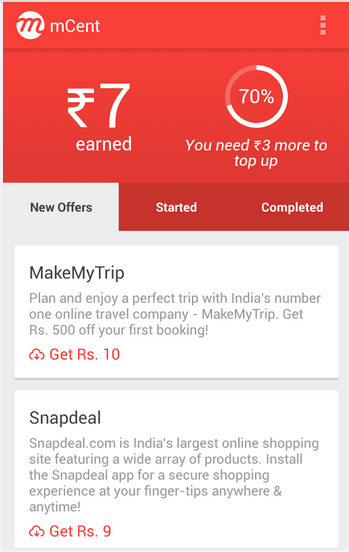
Everyone is interested in getting money free. If there is a app to give money if you install other apps?? Yes recently i have come across one such app through which you can earn money. I personally checked this app and its working absolutely fine. NO SCAM. Unlike other apps it has a minimum payout of 10 Rupees only Which can be easily generated in one day.

Download the Application form below link. Install it on your android phone. For the First Time


Download Both the above apps form the above links. These are the best apps for getting free recharge by installing apps

You can Earn minimum 30 Rupees by installing Applications
NO SCAM  
100% WORKING
Try once you will definitely love it

If you have Wi-Fi Connection then no need to think about this. Just install this app and through this app Install other apps and get money in your wallet.If you have mobile data package one think because this works only by installing apps.

Earntime is also Best appliation to Earn free Recharge by Installing apps.

Installing and Using LADOOO Application  : 

Download the App From here for Free :


  • After the download gets completed the app installs automatically.
  • On the home screen you an see apps and on the right of it you can see the money you get after installing the app
  • on the right side top corner you can see your earnings.
  • Install the app and open it for 30 seconds and come back to the ladoo app. It checks weather installed and adds credits in your account.
  • Once the app gets installed you can uninstall the application

How to Recharge once you reach Minimum 10 Rupees : 

  • One you have reached 10 Rupees you can Ask for Recharge.
  • It takes only minutes to get your Recharge done.
  • If you click on Right side top corner. Recharge option appears.
  • Enter your number or your Friends number and make the recharge done.
If you are a POSTPAID Costumer you can use this money for recharging your friends or Family members

YOU CAN EARN 5 RUPEES Instantly by referring a friend through Whatsapp facebook etc..

If you have any doubts or problems in recharge you can comment below we will help you resolve your issue. Give a try I hope you will definitely get satisfied with this there is nothing wrong in trying .

We download many Videos and movies to our computer. To watch them we need a video player.You can enjoy the most when you choose a correct media Player.So here we are providing the all time best video players for PC. All mentioned below are the best and can be downloaded for free. Almost all can are compatible for all operating system such as Windows, Mac, Linux. I hope you enjoy the most using these player.

Best Video Players For PC
Also Read : Use Google In a Different Way

Here are the Best Video Players For PC :

VLC Player :

VLC media Player

VLC is a free open-source source supported by almost all operating systems.It can play any kind of media file from small 3GP format to large DVD video. VLC also supports high customizable skins.It also has the normal features like screenshot capturing,keyboard controls and subtitles.VLC Media player can also play video like a desktop wallpaper (full Screen mode).It has an simple interface and can also be used for saving play lists,storing local media. Streaming and listen to internet radios.

VLC has the ability to play incomplete,damaged or unfinished videos.It is more helpful when you are downloading a video and download has failed.You can also Preview the downloading file. VLC can stream live,unencrypted to monitor or HDTV. It has also got an android version but has not become that popular.

Download VLC Here

Don't Miss : Key Board Short cuts to save time

Media Player Classic Player :

Media Player Classic

Media Player Classic is a classic media Player compatible for old version of windows98 while keeping the codecs and codecs and features for current version of videos.It is free and light weight software. Its customizable keyboard short cuts and user friendly interface makes it stand in front of other players.

Media Player Classic can be more interesting and useful if you install proper codecs.It plays almost all video formats. If you are looking for powerful minimalistic media player then this might be the right option for you. It doesn't have many customizable options as in VLC player.

Download Media Player Classic Here 

GOM Player :

GOM player

GOM player is another full featured media player that is compatible with popular operating systems and can play audio's and video's of almost all formats with ease.Like VLC player it can also play the damages and incomplete videos.Originally It was designed to stream videos of GOM TV ( a korean TV ) 

It has three viewing modes Normal High Quality and TV output. You can choose the mode depending on your requirements and based on system compatibility.To play a video format you should download the particular codec and watch the video.It's skins are customizable and has special features like varying subtitle size.It has a different style compared to VLC and Media Player Classic.

Download GOM player 

Don't Miss : Protect Your G-Mail 2 step Verification

KM Player :

KM Player

It has has the same functions like Media player Classic and if you don't like to use Classic Player you can opt for this.It has all media player settings at your finger tips.It also supports a number of video formats including DVD play back.You can choose the different skins for different types of files you are using.While Playing videos you can customize video filters and enjoy screen capture utility.It is compatible for Windows operating system.

Download KM player

Winamp : 

Winamp Player

Winamp Player is high functional and free.If you are looking fore more functions for free then you can use Winamp media Player.The remarkable feature of Winamp is cross platform syncing with I-pods and other portable devices. It has add-on and plug in support. You can unlock premium features like CD burning and Mp3 encoding.It is most customizable player but you cannot play some formats of files.

Download Winamp 

Real Player :

Real Player
Real Player formerly know as RealOnePlayer which supports Windows, Mac, Linux, Android Operating systems.It was primarily used for playing of recorded media.Real Player is compatible with many multimedia formats.It is compatible with Windows, Mac, Android, Symbian and Linux operating systems. It aslo has plugins and customizable skins. It was popular before but slowly it is becoming unpopular. Before it was used as an plugin to watch streaming videos and listen streaming audio.But after Adobe Flash is preffered than real Player.


Based on the above choose the best player that meets your requirements.Always go for VLC if you are not satisfied then try a different player.

Also Read : Amazing and Funny Google Tricks

Comment your favourite one among the above listed players and share your view with us.

Enjoyed the post?? share with your friends on social Media.
For more Tech Tricks and Tech Updates Like us on Facebook Or Subscribe us via E-mail.

Thank you... :)


Downloading Movies Videos and Files through torrent has been increasing day by day. To download files faster it is important that the torrent should  have a good number of  seeds and leaches. So you should always prefer downloading torrents from the top 10 best torrent sites as there will be many seeders and leaches. And also you can see in the user comments whether the file is original trusted or any other issues will be clarified without wasting your time.

Here are the Best Sites For Downloading TORRENTS :

1. Torrentus.to

Rather new search engine for bittorrent files that works similar to Torrentz. The service creates easy and convenient search through more then 25 trackers at once.
check here: http://torrentus.to/

2.TorrentDB

TorrentDB is ultimate database filled with torrent files from over the whole network. It's less a tracker site or a search engine, it's more a place where you will be able to find every torrent file that was ever uploaded to the network. TorrentDB picks description, content, quality, rating, seeders and leechers amount from the external sources and provide additional links to the trackers to get the file
check here: http://torrentdb.li/

3.The Pirate bay :

The Pirate Bay (commonly abbreviated TPB) is a website that provides torrent files and magnet links to facilitate peer-to-peer file sharing using the BitTorrent protocol. It was founded in Sweden in 2003. Due to some issues it is blocked in 15 major countries including India UK Sweden Norway etc.
You can also get access to Pirate bay in these blocked countries using Proxies. It is the best place to download torrents with over a billion pageviews  a month.

4. Kick Ass torrents :

Kick Ass torrents is also one of the best place to find all types of files like movies videos files softwares to download  through torrents. It also uses peer to peer file sharing using Bit Torrent Protocol. It was founded in 2008.  It is Blocked in UK Ireland Belgium and other countries due to copyright issues.

5. Torrentz.eu :

It is the second most popular torrent website next to Pirate Bay.This site indexes torrents from various major torrent websites and offers compilations of various trackers per torrent that are not necessarily present in the default .torrent file, so that when a tracker is down, other trackers can do the work. You can search for the desired file without any registration and can be downloaded from the given list of torrent sites.

6. Extra torrents :

Extra Torrent is the 5th most visited torrent site. It has all kinds of torrent files and this is also blocked in some major countries.Beside the torrent it has the comments link, Size,Peers,Seeds and health of the torrrent.

7. EZTV :

It indexes torrents and provides magnetic links. It stictly contains only Televison based content like TV shows etc.It is more popular in Australia.

8. Bitsnoop :

Bitsnoop is a torrent search engine. It was launched in 2009. You can search for any content and download them free. It searches all the bittorrent clients andthe torrents can be downloaded directly without any redirection. 

9. Monova.org :

Browse and Download Movies TV shows Pictures animes Games from this Sites. Daily many files will be added to this sites. Beside every torrent you can see the size seeds peers and health of every torrent. CHoos the file with more number of seeds and download torrent.

10. Torrents.to :

It is also similar to Bitsnoop. It helps in searching the file in the other bittorrent sites. Applying filters you can search for content in the specific torrent site. It makes your work easy and simple. It has the categories of the specialized torrent sites where the probability of finding are more. Like EZTV for tv shows what.cd for music etc.

11. Torrent Reactor :

Choose the category and search for the files you wish to download. All kinds of files and media content are available in this torrent site. It has an alexa rank of 3k .

12. Seedpeer.me :

Sometimes we face situation where a torrent file downloads incompletely. It will be left ate 99% seedless. By downloading files from seedpeer you will not be facing such errors. The admins of seedpeer will verify all things and then make the torrent available.

Link : http://www.seedpeer.me/

These are the best Sites to Download Torrents. Download and enjoy..

Subway Surfers is one of the most popular and most played game on Smart phones. It is also the most downloaded game on Apple store and Google Play Store. Want to Make High scores on Subway Surfers?? Searching for Subway Surfers Tricks to compete with your friends?? Need Subway Surfers Cheats ?? Here are some tips for beginners to collect more money and unlock characters and also make high scores.
Subway Surfers Cheats

Follow these tips and tricks mentioned below to make unforgettable scores in Subway Surfers..To make high score you can follow two different methods. One is knowing about the Subway Surfers Cheats and tricks to play and other is simply Downloading the Unlimited Coins and Cracked Version which is posted below.


Subway Surfers Cheats Tips and Tricks to Make High Scores ( Method 1) :

To know the tricks to play more time and to avoid crash Follow these...

1. Know about the Power ups :

Powers are the main powers that helps to double the game score or help to increase the coins.Basically there are four power ups which will come randomly. Each power up has its own importance. So don't miss them.

X2 Multiplier :  Doubles the multiplier you have and helps to increase the score twice when you collect it.
Coin Magnet : Helps to collect all the coins. the coins come themselves and gets collected
Super Sneakers  : Helps to jump over Trains, High Jumps.
Jet Pack : Flies in air for a while and you will not get any trains just you need to collect coins.

2. Use Hover boats, Score Boosters, Power Starters :

Using these powers helps in making high scores. Use Hover boats wisely  like when you understood that you are going to die, just before crashing, When you have opportunity to make high scores.

3. Try to be on the Top :

Try to be on trains as much as possible because when you are down your chances of crashing are high. So if you are playing mostly on the trains your chances of making high scores are more.

4. Use these Moves :

Do you know you can also cancel your jump?? and also move in air?? Use this moves which can help you..
  • Jump & Right → Move to the right while in mid-air
  • Jump & Left → Move to the left while in mid-air 
  • Jump & Roll → Cancels your Jump then instantly goes into a Roll
  • Roll & Jump → Cancels your Roll then instantly goes into a Jump

Make High Scores with Cracked Version (Method 2) :

Subway Surfers Cheats Unlimited coins and KEys

If you want to have unlimited money and unlimited keys then Download the Cracked Version from here.


This Cracked version has its own restrictions that you can not share your High score on Facebook and also there will be no end to the game as there are unlimited keys you may get bored.

Enjoyed the post?? share with you friends on Facebook. Comment your views below..